M250 Reader Configuration via USB Flash Drive
(this document is targeted for M250 reader firmware 1.5.5 and up)
As of v1.4.0, the configuration of the reader can be performed via a comma-separated value formatted file provided on a USB storage device, such as a USB Flash drive rather than using the RF Code Reader Configuration Utility. The CSV formatted file must contain at least two lines:
- one line (the first line) defining the columns (where each of the columns names must match one of the known and supported attributes of the reader – details below)
- and a second line(s) containing the values for the settings to be updated, including a serial number value matching the M250 reader(s) serial number.
The CSV may contain as many lines as is desired, allowing the same USB storage device to be used to configure multiple readers – each reader seeing the file will attempt to locate and use the first line containing a matching serial number. Once found and processed, the reader will write a log file on to the root directory of the USB drive, with a name corresponding to the reader's serial number, with the file extension '.log' (e.g. '0117901NI00040.log'). If the log file for the reader already exists on the drive, the log will be appended to. If the reader’s serial number is not in the CSV file, no .log file will be written.
The USB drive must be prepared as follows:
- The format of the drive MUST BE 'FAT32' or 'Ext2'. ('NTFS' or 'Mac File System' formatted drives will not function properly.)
- The drive must be writable.
- The CSV file must be in the root of the USB drive, and be named 'rfcConfig.csv'
The rfcConfig.csv file must be prepared as follows:
- The separator used must be commas.
- Fields containing commas as values must be enclosed in double-quotes (“a value, with commas”).
- A double-quoted field containing a value containing double-quotes must repeat the double quotes (e.g. “He said “”Hi There””.”)
- The first line of the file must contain the IDs of the columns for the values in the file, and all the column IDs must match those defined below.
- One of the columns defined must be the 'serialnumber' column ID (with the value of the column corresponding to the reader's serial number). This column is used by the reader to identify which row in the file contains its settings.
- If the reader has been configured with one or more user-IDs and passwords, the CSV must contain a 'userid' column ID and a 'password' column ID, with the corresponding values providing the user ID and password for an 'administrator' account on the reader, in order for the reader to authenticate the configuration request.
- Any columns with blank values (no characters) will be ignored. If a field is intended to be set to a blank value, the value column should have the value '<null>'
Once the rfcConfig.csv file is created and saved to a USB stick, with the M250 reader powered on, insert the USB stick into the USB port located on the back of the reader. When the CSV is done being processed, the “In Use” and “Status” LEDs on the reader will flash, based on the success or failure of the operation. If BOTH LEDs flash together quickly, an error has occurred, and no changes have been made – see the log file on the USB drive for details. If the two LEDs alternate flashing slowly 4 times, the reader has been successfully configured, and will restart itself with the new settings. In either case, the USB drive is safe to remove as soon as the LEDs begin flashing their pattern.
Configuration File Settings
| Column ID | Definition |
|---|---|
| eth_ipaddress | IPv4 address for Ethernet (if static) |
| eth_subnet | IPv4 subnet mask for Ethernet (if static) |
| eth_gateway | IPv4 gateway address for Ethernet (if static) |
| eth_ipaddress6 | IPv6 address for Ethernet (if static) |
| eth_gateway6 | IPv6 gateway address for Ethernet (if static) |
| eth_maskcnt6 | IPv6 subnet mask bit count for Ethernet (if static) |
| eth_enabled | Interface enable/disable for Ethernet (true=enabled, false=disabled) |
| eth_dhcp | DHCP enable/disable for Ethernet (true=enabled, false=disabled) |
| eth_auto6 | Auto-configuration setting for IPv6 on Ethernet (Disabled, IPv6AutoConfig, StatelessDHCPv6, StatefulDHCPv6) |
| wifi_ipaddress | IPv4 address for Wi-Fi (if static) |
| wifi_subnet | IPv4 subnet mask for Wi-Fi (if static) |
| wifi_gateway | IPv4 gateway address for Wi-Fi (if static) |
| wifi_ipaddress6 | IPv6 address for Wi-Fi (if static) |
| wifi_gateway6 | IPv6 gateway address for Wi-Fi (if static) |
| wifi_maskcnt6 | IPv6 subnet mask bit count for Wi-Fi (if static) |
| wifi_enabled | Interface enable/disable for Wi-Fi (true=enabled, false=disabled) |
| wifi_dhcp | DHCP enable/disable for Wi-Fi (true=enabled, false=disabled) |
| wifi_auto6 | Auto-configuration setting for IPv6 on Wi-Fi (Disabled, IPv6AutoConfig, StatelessDHCPv6, StatefulDHCPv6) |
| httpport | Port number for HTTP interface (-1=disabled) |
| httpsport | Port number for HTTPS interface (-1=disabled) |
| legacyport | Port number for reader legacy interface (-1=disabled) |
| termport | Port number for reader terminal interface (-1=disabled) |
| sshdport | Port number for reader SSH interface (-1=disabled) |
| dnsdomain | DNS domain for reader |
| hostname | Hostname for reader |
| dnsservers | Comma-separated list of DNS servers for reader |
| ntpservers | Comma-separated list of NTP servers for reader |
| upconn_id | Selects the ID of the up-connection to be configured: MUST be provided before any other upconn_* columns, in order to select their target connection |
| upconn_hostname | Hostname for up-connection selected by last upconn_id column |
| upconn_port | Port number for up-connection selected by last upconn_id column |
| upconn_rdrid | Reader ID to be used by up-connection selected by last upconn_id column |
| upconn_pwd | Password to be used by up-connection selected by last upconn_id column |
| upconn_enabled | Enable/disable up-connection selected by last upconn_id column (true, false) |
| useraccount_id | Selects the ID of the user account to be configured: MUST be provided before any other useraccount_* columns, in order to select their target user account |
| useraccount_password | Password to be set for user account selected by last useraccount_id column |
| useraccount_role | Role to be set for user account selected by last useraccount_id column (admin,configview, eventview) |
| macaddr | NOT USED - Matching column: value is used by reader to select which row in the file to use – value must match the Ethernet MAC address for the reader |
| serialnumber | Matching column: value is used by reader to select which row in the file to use – |
| value | must match the manufacturing serial number for the reader |
| userid | Authentication column: if the reader has been secured with one or more user accounts, this column must provide the user ID of an account with the 'admin' role in order to authenticate the configuration process |
| password | Authentication column: if the reader has been secured with one or more user accounts, this column must provide the password of an account with the 'admin' role in order to authenticate the configuration process |
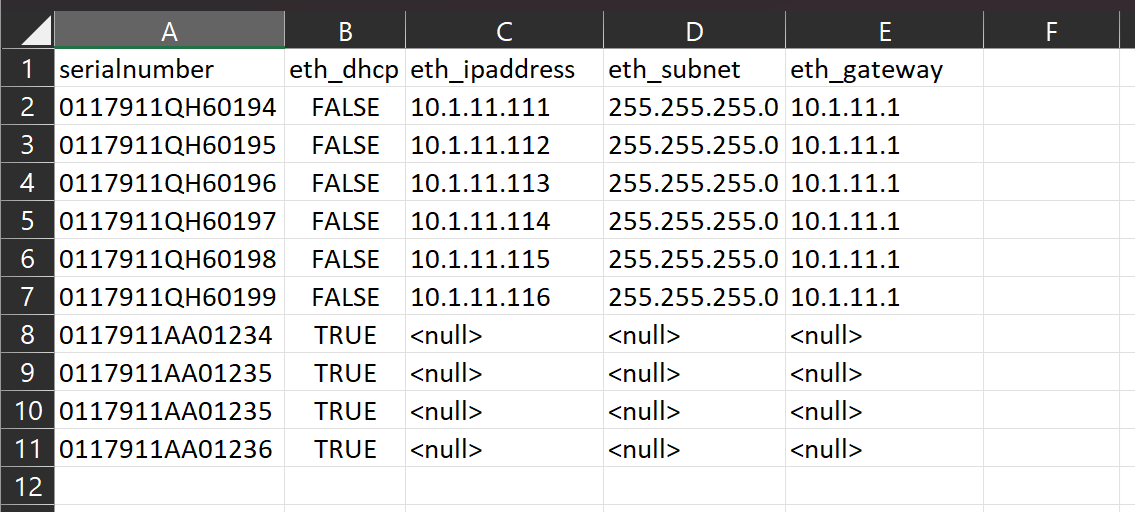
Basic Example File: (minimal configuration)
serialnumber,eth_dhcp,eth_ipaddress,eth_subnet,eth_gateway
0117911QH60194,FALSE,10.1.11.111,255.255.255.0,10.1.11.1
0117911QH60195,FALSE,10.1.11.112,255.255.255.0,10.1.11.1
0117911QH60196,FALSE,10.1.11.113,255.255.255.0,10.1.11.1
0117911QH60197,FALSE,10.1.11.114,255.255.255.0,10.1.11.1
0117911QH60198,FALSE,10.1.11.115,255.255.255.0,10.1.11.1
0117911QH60199,FALSE,10.1.11.116,255.255.255.0,10.1.11.1

0117911AA01234,TRUE,<null>,<null>,<null>

0117911AA01235,TRUE,<null>,<null>,<null>

0117911AA01236,TRUE,<null>,<null>,<null>

0117911AA01237,TRUE,<null>,<null>,<null>
(This basic example file is configured to assign static ip addresses, subnets, and gateways to the first 6 readers and the last 4 readers will be set to DHCP)
This is the same basic example file as displayed in Excel – be sure to save as a comma separated file named rfcConfig.csv and NOT as an .xls file.